
www.rabbitcalls.com+91 8140501868support@rabbitcalls.com
Call logs
Search and filter every call — play recordings, export, and open Call details.
Module guide
Call logs
Search and filter every call — play recordings, export, and open Call details.
Purpose
Call logs is the full history of inbound and outbound calls — status, duration, time, agent, and recordings. Use it to QA agents, investigate missed transfers, and export for reporting.
What you see
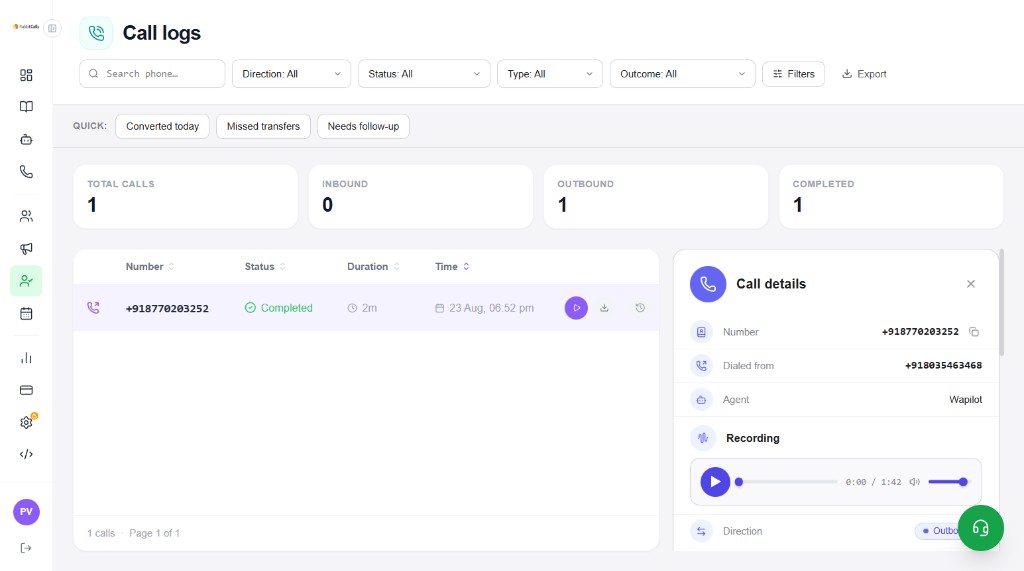
Top stats: Total calls, Inbound, Outbound, Completed. The table lists Number, Status, Duration, and Time. Open a row to show Call details on the right.
- Search phone… — find a number quickly
- Filters — Direction, Status, Type, Outcome (plus Filters / Export)
- Quick chips — Converted today, Missed transfers, Needs follow-up
- Row actions — Play recording, Download, History
Call details panel
Selecting a call opens Call details with the destination number, Dialed from (your caller ID), Agent name, Direction (Inbound / Outbound), and an audio player for the recording.
- Copy the destination number from the panel
- Play / scrub the recording (e.g. 0:00 / 1:42)
- Confirm which agent handled the call (e.g. Wapilot)
- Match Dialed from to your Phone numbers / campaign caller ID
Tip: Use Call logs after a Campaign run or Test call to verify the agent script and audio quality before scaling concurrency.
How it relates to other modules
- Campaigns — outbound dials appear here with your campaign caller ID
- Agents — Agent column / detail shows which voice agent ran
- Phone numbers — Dialed from is the number you assigned
- Leads — qualification outcomes; Call logs is the raw call + recording trail
- Analytics — aggregates; Call logs is the per-call drill-down