
www.rabbitcalls.com+91 8140501868support@rabbitcalls.com
Developer
API keys, public REST endpoints, and webhooks for call and appointment events — no polling required.
Module guide
Developer
API keys, public REST endpoints, and webhooks for call and appointment events — no polling required.
Purpose
Developer has two tabs: API (keys + endpoint reference) and Webhooks (push events to your server). Use them to connect CRMs, form-fill dials, Wapilot, or your own backend.
API keys
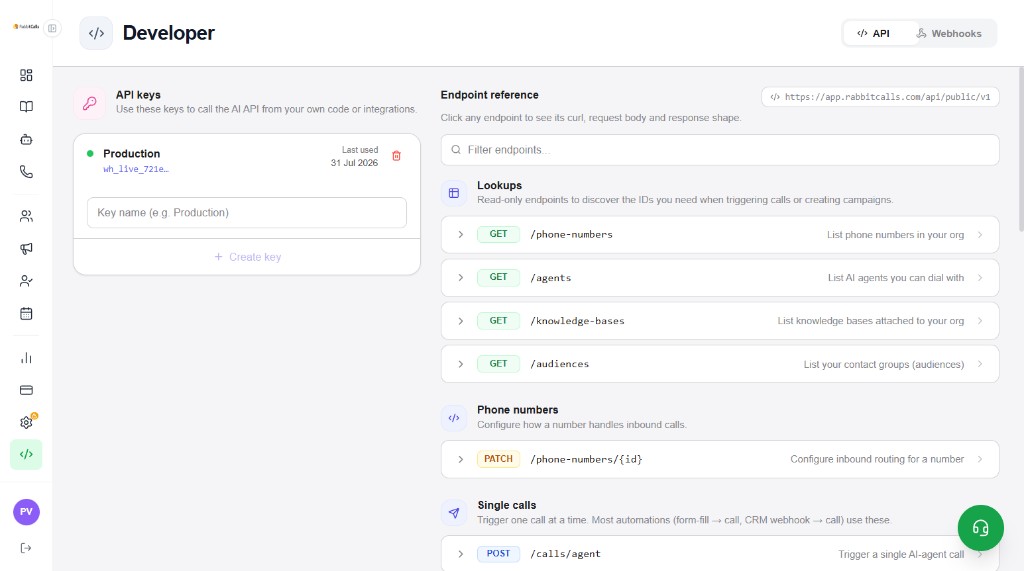
On the API tab, create named keys (e.g. Production) to call the AI API from your code. Keys are shown masked (e.g. wh_live_…). Delete unused keys with the trash icon.
- Enter a key name → + Create key
- Copy the secret once when created — store it in your server env, never in frontend code
- Last used date helps you spot stale keys
Base URL & endpoints
Public API base URL: https://app.rabbitcalls.com/api/public/v1. Filter endpoints in the search box. Expand a row for curl, request body, and response shape.
- Lookups (read-only) — GET /phone-numbers, GET /agents, GET /knowledge-bases, GET /audiences
- Phone numbers — PATCH /phone-numbers/{id} (inbound routing)
- Single calls — POST /calls/agent (form-fill / CRM → one AI call)
- More groups in-app — campaigns, IVR/human calls, webhooks helpers as listed
Webhooks
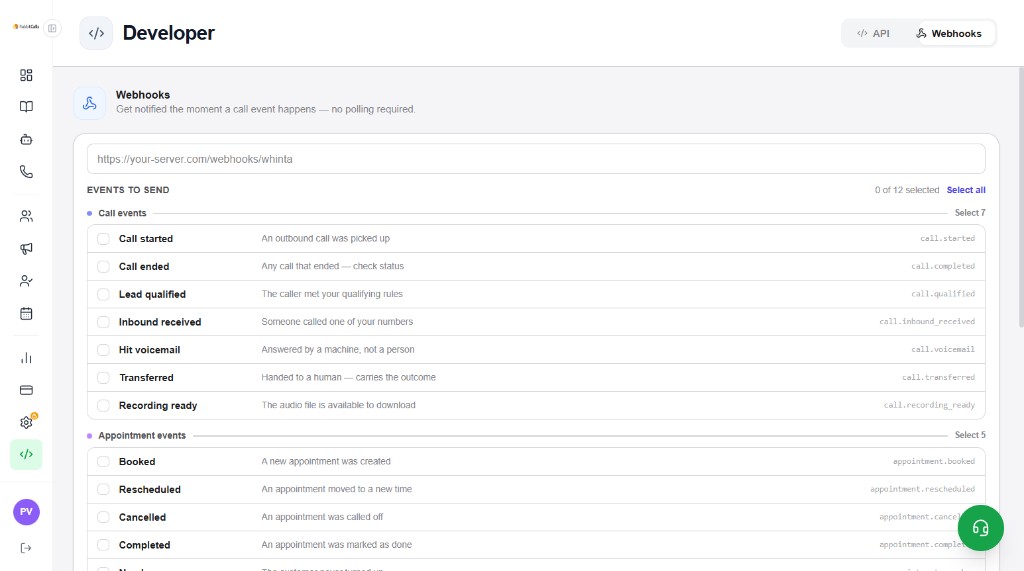
Switch to the Webhooks tab. Enter your HTTPS endpoint URL and select which events to send (0 of 12 selectable). RabbitCalls POSTs when events happen — no polling.
- Endpoint URL — e.g. https://your-server.com/webhooks/whinta
- Select all or pick individual events
Call events
- call.started — outbound call was picked up
- call.completed — any call that ended (check status)
- call.qualified — caller met qualifying rules
- call.inbound_received — someone called your number
- call.voicemail — answered by a machine
- call.transferred — handed to a human
- call.recording_ready — audio file available to download
Appointment events
Useful when Agents book slots and you sync to CRM or Google Calendar workflows.
- appointment.booked — new appointment created
- appointment.rescheduled — moved to a new time
- appointment.cancelled — called off
- appointment.completed — marked done
- appointment.noshow — customer never turned up